
Receive Kick Credentials
Before the bot can start chatting, it needs a way to log in. Kick uses the OAuth 2.0 system to let the bot request access to your channel.
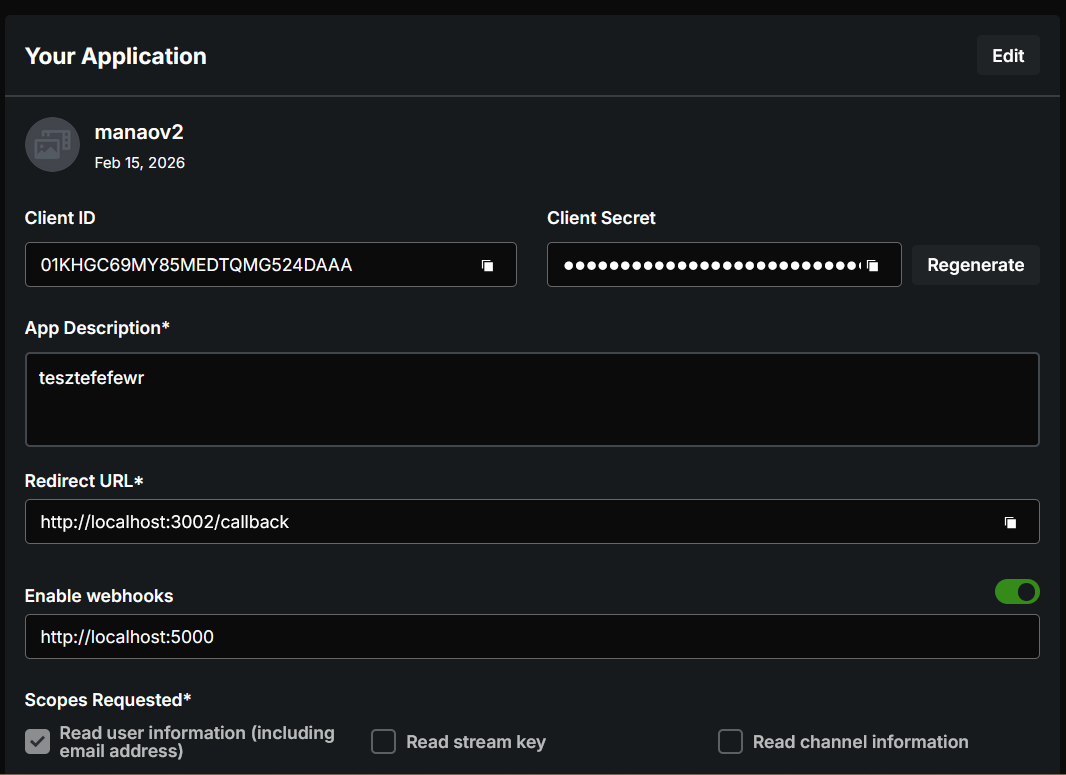
Manao needs a Client ID and Client Secret from Kick to authenticate the bot.
Create an Application
Section titled “Create an Application”- Log in to Kick.com
- Go to Settings → Developer
- Click Create new
- Fill in:
- Name: Any name (this will be the bot’s display name in chat)
- Description: Anything
- Redirect URI:
http://localhost:3002/callback— exactly as shown - Enable Webhooks: Turn on, then enter
http://[YOUR_NGROK_DOMAIN]/kick/webhooks(See Ngrok setup) - Scope Requested: Check all
- Click Create App
Copy the Client ID and Client Secret — you’ll need them in the Setup Wizard.
Setup Wizard
Section titled “Setup Wizard”Open the Setup Wizard at http://localhost:4000, go to the Kick page, then:
- Enable Enable Kick
- Enter Client ID and Client Secret
- Enter Ngrok Authtoken and Ngrok Domain (See Ngrok setup)
- Click Authorize Kick Account — Manao opens a browser window automatically
- Once the browser shows ✅, click Next